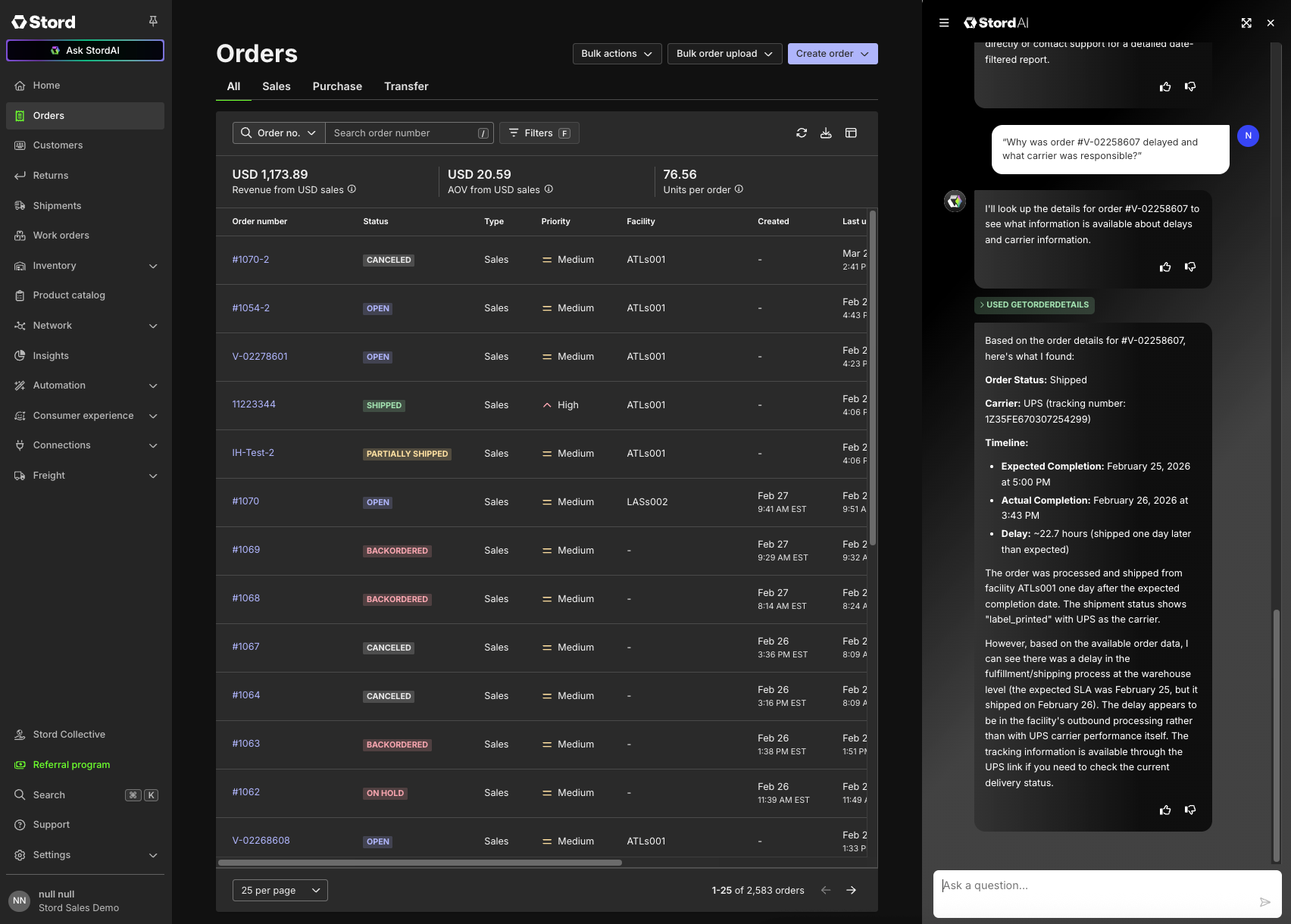
StordAI Chat is a generative AI assistant embedded directly in the Stord OMS. It enables you to get real-time updates on your network, navigate the platform more efficiently, answer operational questions using live data, and take actions all through a conversational interface.
Accessing StordAI Chat
StordAI Chat is accessible via the Ask StordAI icon in the left-hand navigation panel. From there you can:
Open the chat panel alongside your current view, or expand it to full screen for a more focused experience.
Start a new conversation at any time, or access your chat history to pick up where you left off.
Use the suggested prompts that appear when you first open the chat to explore common use cases.
Contextual Awareness
StordAI Chat is aware of the page you're currently on within the OMS. This means you can ask questions about what's on your screen. For example, ask about a specific order while viewing the Orders page and receive relevant, context-aware responses.
Sharing Feedback
Your feedback helps us continuously improve StordAI Chat. You can use the thumbs up / thumbs down buttons directly inside the chat to rate any response. This is the fastest and most effective way to let us know what's working and what isn't.
What Can StordAI Chat Do?
StordAI Chat spans a wide range of operational capabilities. Below is a summary of what you can ask about, along with example prompts to get you started.
Order Management
Get visibility into your orders without manually filtering through the OMS. You can view orders, search for specific details, check statuses, identify exceptions, and surface operational issues.
Example prompts:
"Find all orders that shipped late this week."
"What orders are currently in an exception state?"
"Show me the details for order #98765.
Inventory Management
Surface real-time inventory data, flag stock issues, and understand availability across facilities, bundles, and channels.
Example prompts:
"What products are out of stock across my facilities?"
"Show me inventory for SKU ABC-123 at the Dallas warehouse."
"Do I have any expired or expiring inventory I should know about?"
Returns Management
Stay on top of inbound returns with visibility into return volumes, individual return details, and status breakdowns.
Example prompts:
"How many returns are pending processing right now?"
"What's the status of return #45321?"
"Give me a breakdown of return counts by status."
Network & Configuration
Ask questions about your network setup, warehouse locations, shipping methods, carrier options, and channel connections.
Example prompts:
"What shipping methods do I have available?"
"Which warehouses am I currently operating out of?"
"What sales channels are connected to my account?"
Products
Look up product details, search your catalog, and review items and bundles.
Example prompts:
"Find all products matching 'hoodie'."
"What are the full details on SKU XYZ-789?"
"Show me all active bundles in my catalog."
Summaries & Operational Briefings
Get a high-level operational snapshot by pulling together data from across the OMS — ideal for starting a shift or preparing for a morning standup.
Example prompts:
"What's the status of my fulfillment network right now?"
"Summarize any issues I should know about this morning."
"How many orders shipped yesterday, and were there any exceptions?"
Help & How-To
Ask how-to questions powered by the OMS Knowledge Base. This is especially useful for onboarding new team members or finding features you don't use often.
Example prompts:
"How do I create a return request?"
"What's the process for adjusting inventory?"
"How do inventory reason codes work?"
Taking Actions
StordAI Chat can also take actions on your behalf, such as creating products or initiating returns. Whenever an action would modify data in the OMS, the chat will prompt you to review and confirm before anything is executed. No changes are made without your explicit approval.
Was this article helpful?
That’s Great!
Thank you for your feedback
Sorry! We couldn't be helpful
Thank you for your feedback
Feedback sent
We appreciate your effort and will try to fix the article