StordAI Feed is a personalized intelligence stream, embedded directly into the Stord Commerce Suite, that proactively surfaces what matters most before it becomes a problem. StordAI Feed is made up of various different components including:
Daily Intelligence Summary
The Daily Intelligence Summary is a short, AI-generated briefing at the top of the OMS Home. It answers one question: "What do I need to know right now?" The goal is to give you a quick read on yesterday's network activity and anything worth your attention today, all in about 30 seconds. It's the first component of StordAI Feed, a broader effort to turn the OMS Home into a proactive operations view rather than a static dashboard.
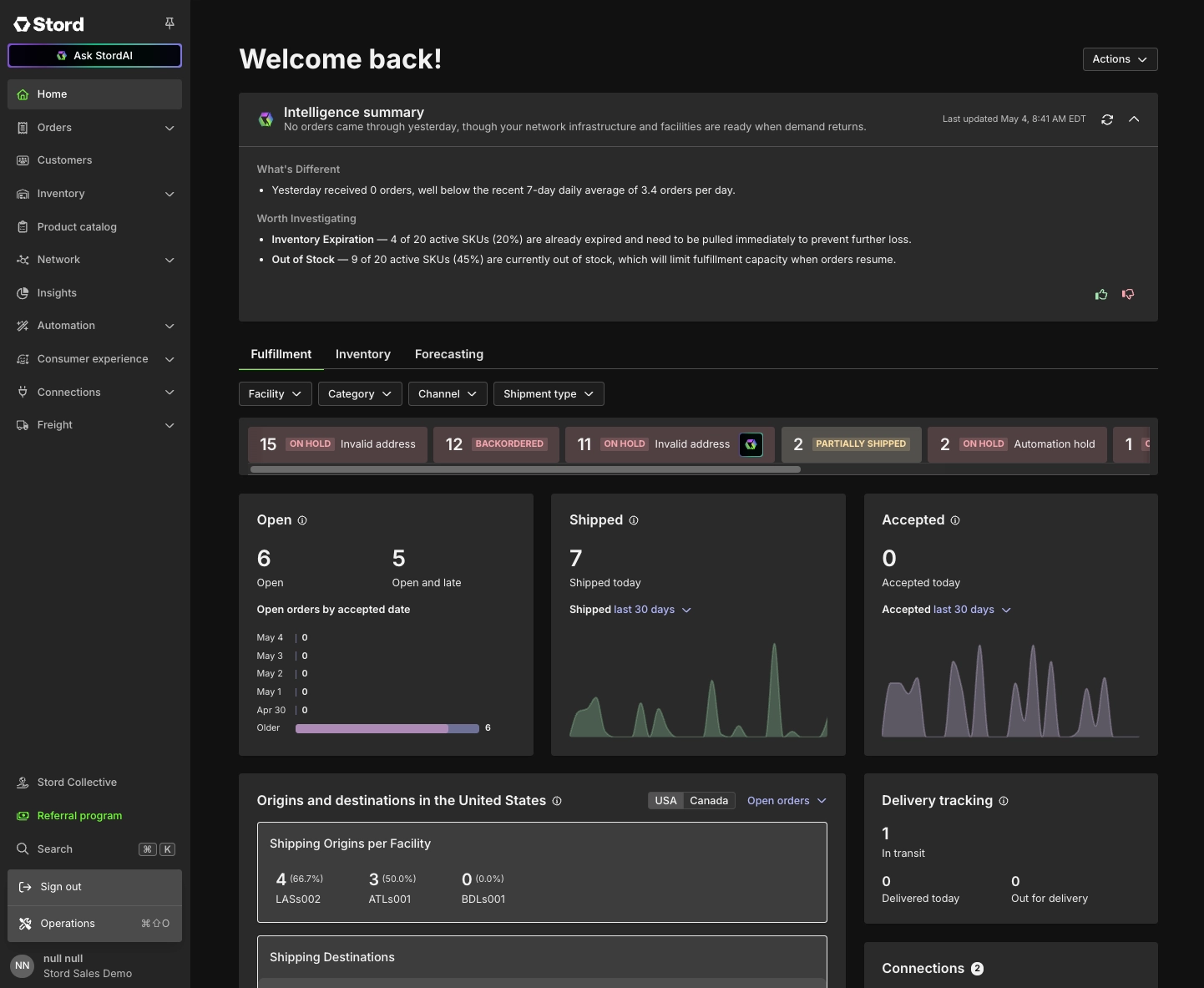
What is it?
The summary sits at the top of your OMS Home when you log in. There's nothing to enable or configure. If the data is available for your network, the summary will be there.
Every summary opens with a one-sentence headline that frames the day, followed by two sections:
What's Different
- A recap of what changed yesterday. This focuses on sales and fulfillment trends, like how many orders came in, how much shipped through the network, and how those numbers compare to recent days. If something notable changed in returns, holds, or inbound activity, you may see it here too.
Worth Investigating
- Things worth a closer look right now. Depending on your network's current state, this section may surface:
- Backordered orders that couldn't ship due to inventory
- SKUs already expired or expiring within 7 days
- Out-of-stock SKUs across your active catalog
- Returns in queue waiting to be processed
- Channel connections reporting errors
- If nothing needs attention, the section will say so.
FAQ
Why is there a mismatch in the data shown in the summary?
- The summary refreshes once per day. Because it's a snapshot from the last refresh, you may notice slight mismatches between the summary and live OMS data between updates. That's expected. For the most current numbers, the OMS dashboard is your source of truth.
Why is the summary not showing the same information as yesterday?
- The numbers, facts, and signals are grounded in your actual data, but the language describing them and prioritization of what insights to surface varies from day to day. This is by design, not a bug.
Can I customize what the summary shows?
- Not yet. Today every user sees the same structure. Personalization is on the roadmap as part of the broader Feed rollout.
What if I don't see a summary at all?
- If your network is brand new or doesn't yet have enough data to generate a meaningful comparison, the summary may not appear. If you expected to see one and don't, contact your account team.
How do I provide feedback?
- If a summary feels off, like it's flagging things that aren't real issues, missing something that is, or just reading strangely, please tell us by using the ? / ? buttons on the summary itself. Your feedback is what makes the next version better.
Was this article helpful?
That’s Great!
Thank you for your feedback
Sorry! We couldn't be helpful
Thank you for your feedback
Feedback sent
We appreciate your effort and will try to fix the article